How to use Paperclip Blueprints and wire the company it gives you
Paperclip Blueprints builds an agent company from a markdown brief. The import carries the operating structure: agents, adapters, models, budgets, projects, routines, skills. Here's what still needs your hands, and where the governing half of the brief has to go if agents are ever going to read it.

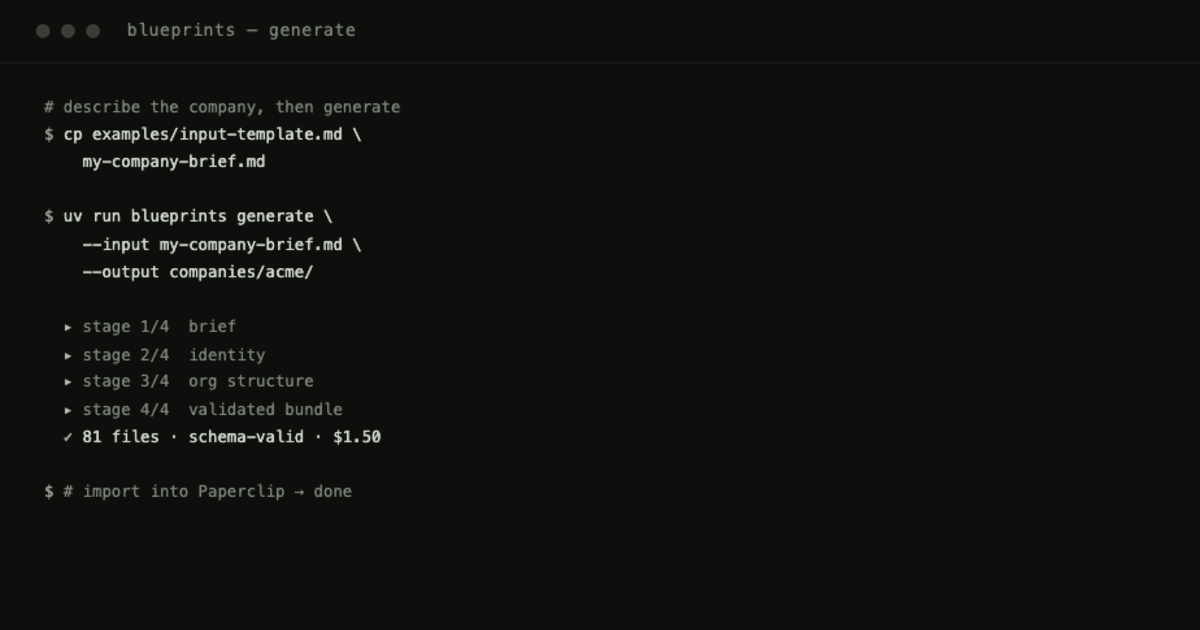
Paperclip Blueprints generates a complete agent company from a markdown brief in about five minutes. Import the bundle and the company is there: the org chart, the agents, the work queued against them. The operating structure arrives with it.
What arrives less completely is the part of the brief that describes how the company should behave. That's not a minor omission. It's the constraints, the north star, the we-are-this-and-emphatically-not-that section, and it's usually the most considered writing in the whole brief. Knowing where it goes after import is the difference between a company that runs and one that runs the way you meant.
I built Blueprints because I was standing up Paperclip companies and hand-writing the same dozens of files every time, drifting a little on each pass. Now I describe the company once, in plain language, and the tool builds it. This is the path from brief to bundle to a company you've wired and woken.
Part 1: From a brief to a bundle
The input isn't config. It's a brief. You describe the company the way you'd describe it to a person: what it is, what it's emphatically not, the outcomes it chases, and the one north star everything serves. Roles, reporting lines, and operating rules are derived from that. You don't hand-write them.
Write the brief, then run one command:
uv run blueprints generate --input my-company-brief.md --output companies/acme/
A few minutes and a dollar or two of API credits later you have a directory in Paperclip's import format: a COMPANY.md identity file, a README with a generated mermaid org chart, an OPERATIONS.md, a PROJECT-INVENTORY.md, and a folder per agent holding its role, mandate, and heartbeat. Every file is schema-checked before it's written, so structural mistakes surface before any agent runs on them.
Check that the bundle declares schemaVersion: 7. A bundle that declares no version is read as legacy, and the import says so, naming the fields that legacy predates. The import still proceeds. The warning is telling you the bundle was written against an older shape than the one the platform reads. Regenerating gets you a bundle that speaks the current one.
Part 2: What comes across as objects
Import a current bundle into a fresh company and this lands intact:
- the agents themselves, each with its adapter and model already set
- the per-agent monthly budget
- the board-approval gate on adding new agents
- projects, tasks, and routines
- skills
None of that needs a second pass. You don't open each agent to choose the adapter that drives it or to assign its model: the bundle said so and the import kept it. The monthly budget lands the same way.
Two things arrive that you never sent. Each agent picks up permission grants, and the company picks up five default skills alongside the ones from your bundle. Neither is a problem, but both are worth reading before anything wakes: the grants tell you what each agent can reach, and the shelf now has more on it than you put there.
Part 3: What stays in the markdown
Export the company you just imported, diff it against the bundle you sent, and the shape of the trip is plain. A 91-line COMPANY.md comes back as seven lines. OPERATIONS.md and PROJECT-INVENTORY.md have no counterpart on the other side at all.
This is structural rather than surprising. A bundle is markdown. The platform stores objects. Anything in the brief that has an object waiting for it (an agent, a project, a routine, a budget, a skill) makes the trip intact. Prose about how the company should think has nowhere to land, because there is no field shaped like it.
What that covers is the governing half of the brief: the constraints, the north star, the boundaries you drew around what this company is for. Written once, carefully, and living in the bundle rather than in the company.
So the operator's question after import isn't whether that text survived. It's how it reaches an agent at run time.
The answer is to put it where objects already go. The agent's own mandate, the skills attached to it, the routines it runs, the description on the project it works in: those are all things the import carries, which makes them the durable homes for the rules you care about. A constraint that binds one seat belongs in that seat's mandate. A rule that binds everyone is a skill on the shelf, attached to everyone it binds. Recurring obligations belong in a routine, where they fire whether or not anyone remembers them.
The test is simple: if a constraint matters, it has to sit somewhere an agent actually reads while it's working. Keep the brief complete anyway (the thinking in it is what makes the mandates good in the first place), but don't rely on COMPANY.md to carry a rule into a running company.
Part 4: The wiring that's still yours
Do this in order. The first one comes before you let anything run.
1. Cap the run policy before anything wakes
The defaults ship wide open. In an agent's Configuration, Max turns per run ships at 1000, and under Run Policy → Advanced, Max concurrent runs ships at 20. A stuck or looping agent at those numbers gets through a great deal before anything stops it.
Bring Max turns per run down to what a real task finishes inside, around 30. Cap Max concurrent runs to 1–2, and to 1 for a decision-maker like the CEO, so two runs can't make conflicting calls at once. If Continue after max-turn stop is on, know that it softens the cap: one continuation attempt means a run can reach roughly 60 turns, not 30.
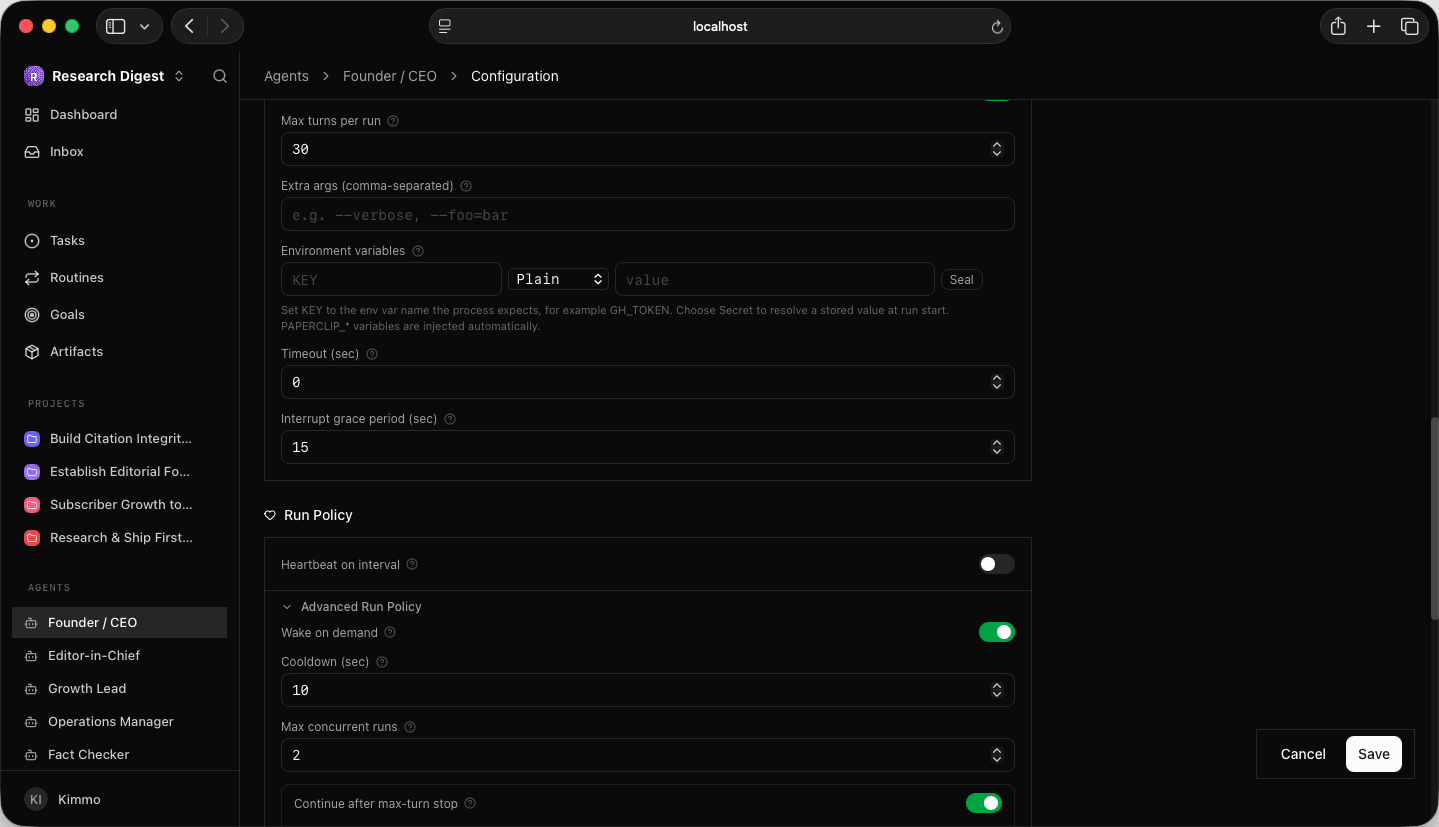
Turns cap the loop; the budget caps the spend. The budget came across with the import, so the turn cap is the half that still wants you. Together they make a bad run fail cheap, which matters because most of a call's tokens are fixed overhead before the agent does any real work.
2. Bind your secrets
A bundle is portable by design, so it can't carry the things specific to your machine and your accounts. Model-provider keys and integration tokens go in as secrets, referenced by the agents, never pasted into a bundle file. In an agent's Configuration → Environment variables, set the key name the process expects, switch the type from Plain to Secret, and Seal it so the value resolves at run start instead of living in the config.
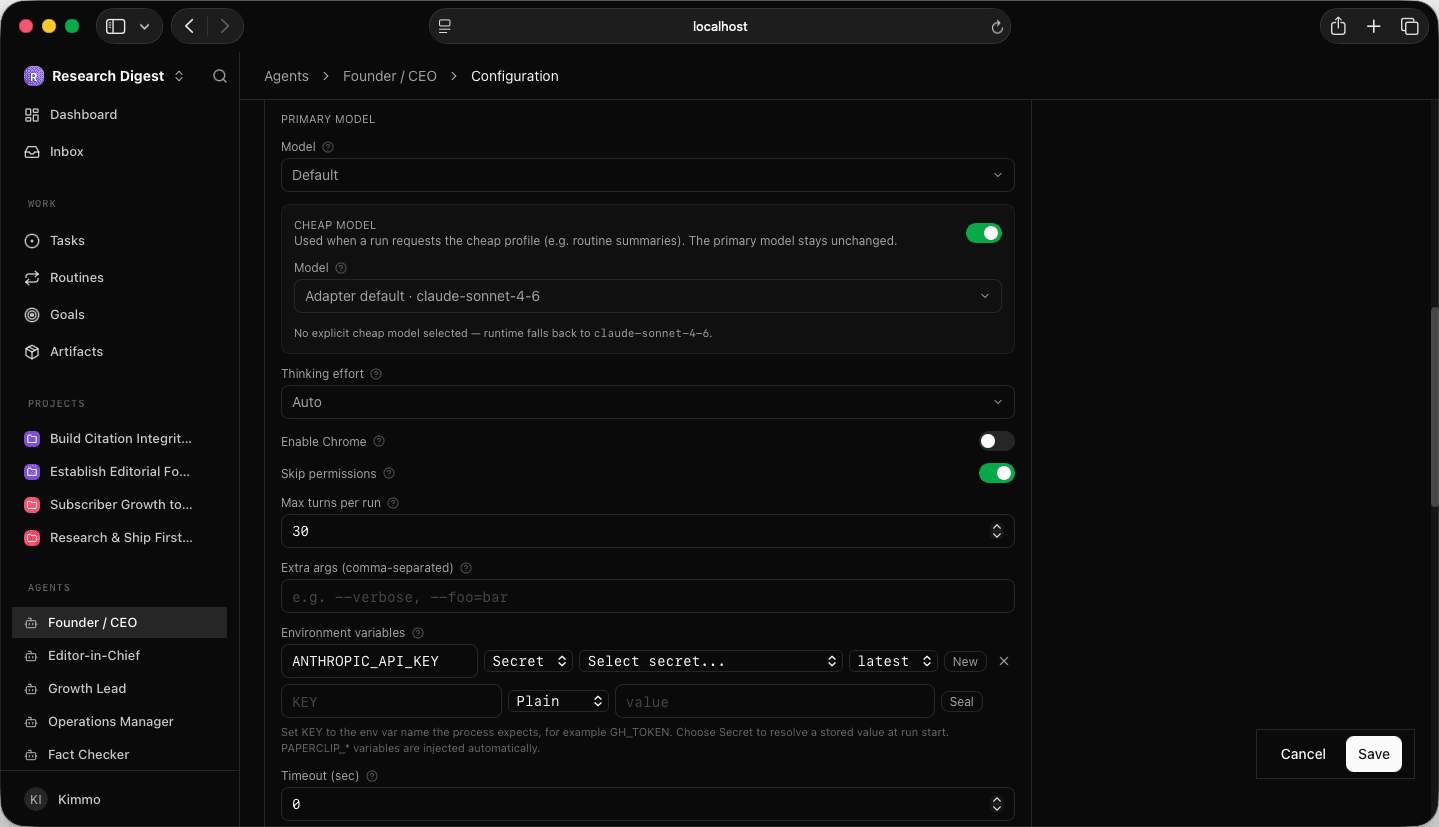
Use a least-privilege credential wherever the work allows it. A secret in a plain field is a secret you'll leak the first time you export or share the company.
This screen is also where the most expensive mistake hides. If an agent runs on a subscription through a local adapter, a provider API key sitting in its environment will take precedence and bill you per token instead. Check the environment block for a stray provider key before you wake anything. And if some agents are meant to run on a model you host yourself, remember the runtime has to exist on the machine. The bundle sets which model an agent asks for, not whether it's there to answer.
3. Check the skills shelf
Skills come across with the import, and the company also has the five defaults it added itself. Open Skills in the left nav and confirm each agent has what the brief intended. The intended list is in each agent's AGENTS.md frontmatter. To add a skill that isn't in the company yet, use Paste path, GitHub URL, or skills → Add at the top of the Skills panel.
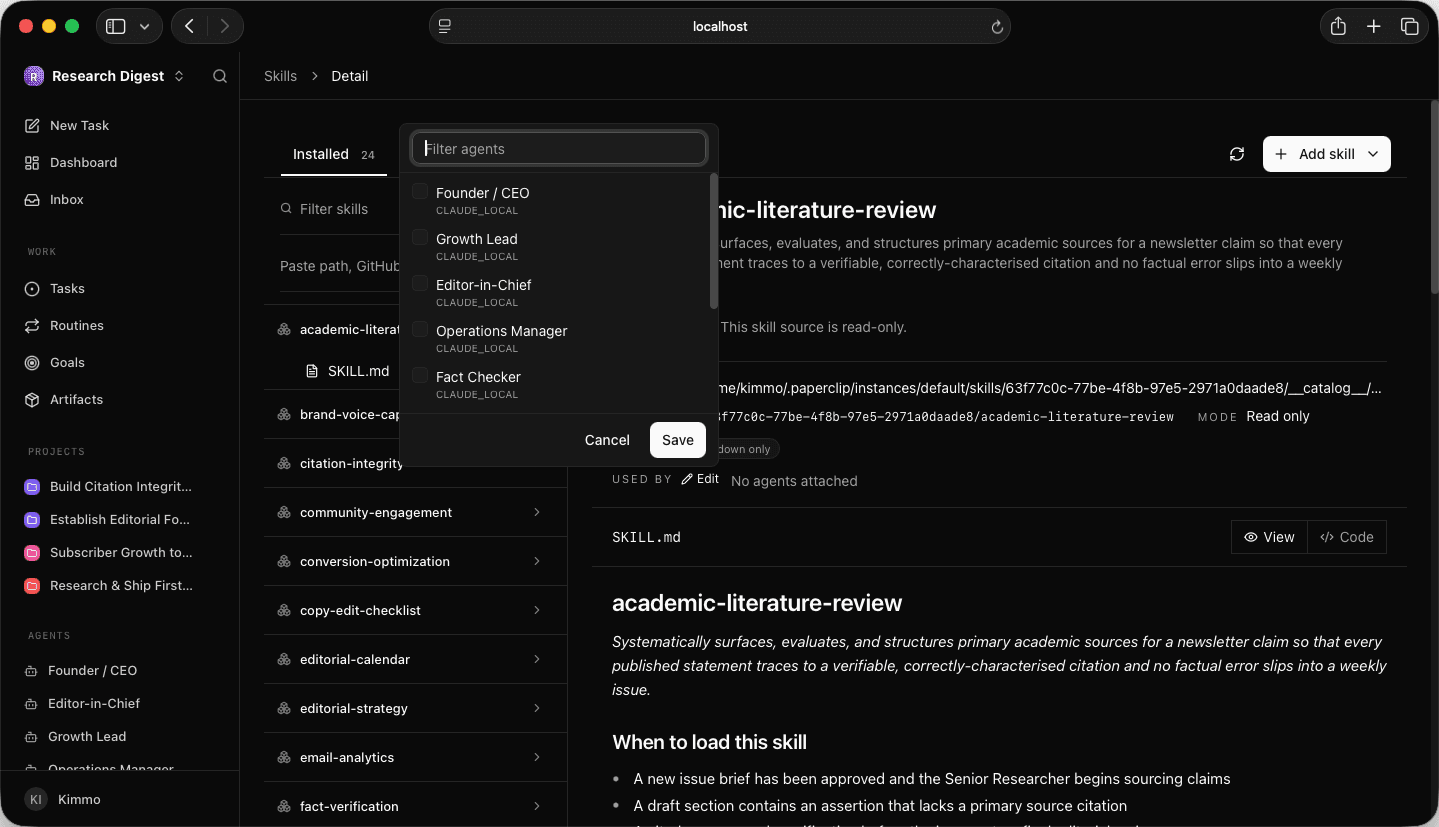
An agent without its skills still runs. It just runs without the knowledge you meant it to have, and nothing errors to tell you.
4. Point your projects at your code
If agents work in a repo, open the project → Configuration → Codebase and set the local folder to the full absolute path on the host (the shorthand ~ is rejected). Set it only on the projects that should touch that code, and leave every other project's codebase unset.
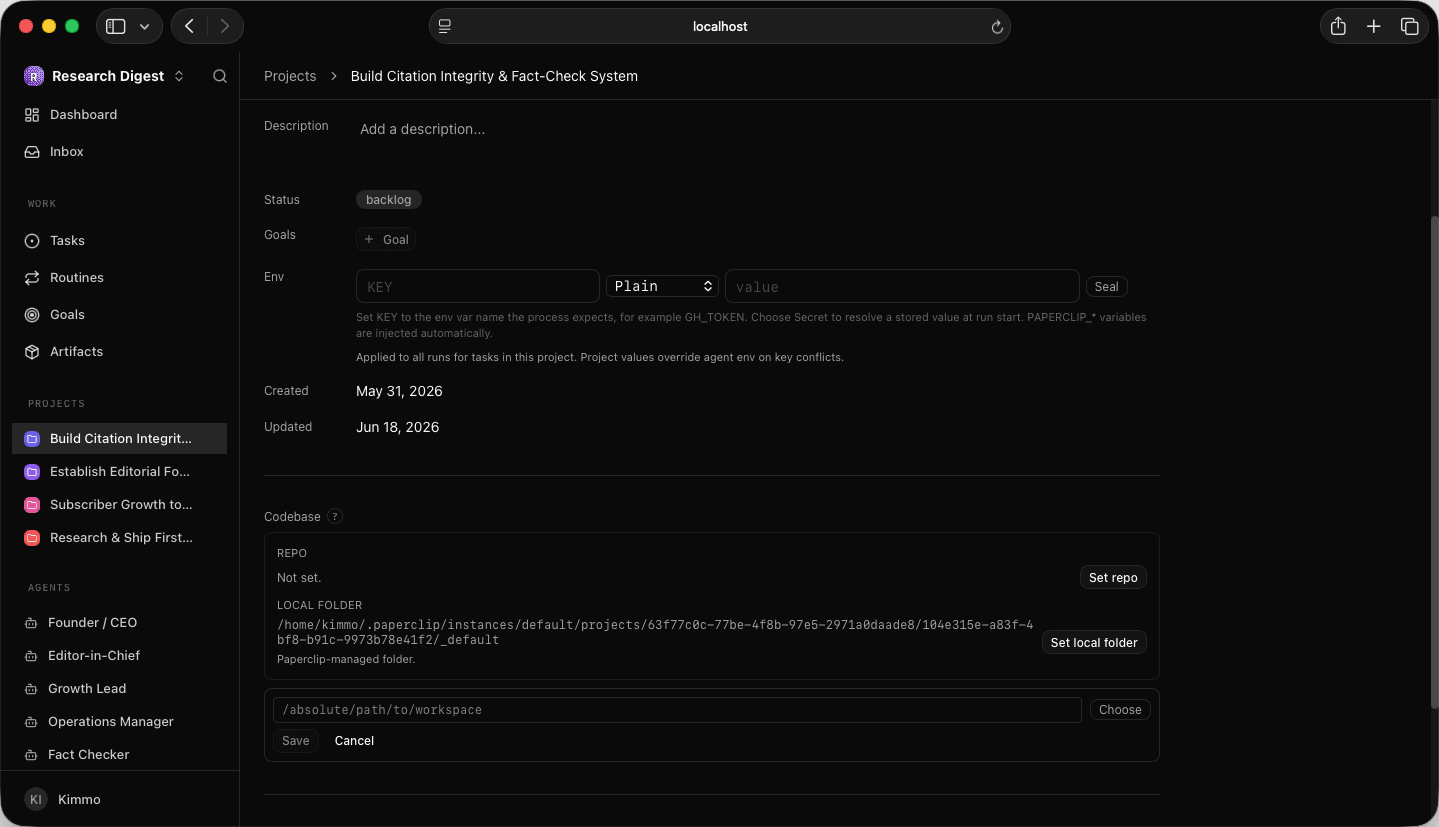
This is your blast radius: an agent can't change code its project can't reach.
5. Set the cadence
Routines come across with the import; how often things fire is still a judgment call. Agents wake on a timer and on events like a task assignment or a mention, so you don't need a fast heartbeat for responsiveness. In Run Policy, Heartbeat on interval is the timed wake and Wake on demand handles events. Reserve the timed heartbeat for proactive recurring work, match its cadence to how often there is genuinely something to do, daily and weekly rather than minutes, and drive recurring jobs from Routines rather than a fast pulse.
A heartbeat firing every few minutes mostly pays to discover there's nothing to do.
6. Read the org back
Connect whatever lives outside Paperclip, then confirm the reporting chain matches the org chart you intended. With the company finally in front of you, reread the generated mandates once and fix what reads wrong now that it's real. This is also the moment to move the constraints from Part 3 into the seats they belong to, while the brief is still fresh in your head.
Part 5: Wake one agent, watch, then ramp
Don't turn the company on. Turn one agent on, the one at the top, using the Run Heartbeat button on its page for a manual wake rather than a schedule.
Then read the run on the Runs tab: did it authenticate, what did it cost, what did it actually decide. The first agent you wake is the one most able to set the whole org moving in the wrong direction, so you want eyes on it before it's on a timer. When that single run looks right, flip on a conservative interval and bring the others up one at a time. A company you raise one agent at a time is one you can still reason about when something surprises you.
Where this goes
The operating structure imports cleanly, and what's left to do by hand divides neatly. Secrets, credentials and host paths can't ride a portable bundle and will always be yours to set. That's the right place for the line. Run-policy caps are a decision about how much a bad run may cost you, which is worth making deliberately whatever the defaults are.
The governing text is the part that's still on you. It has no object waiting for it, so getting it in front of agents is an authoring choice rather than a setup step: write it into the mandates, the skills and the routines that do make the trip. Do that and the company doesn't just run — it runs on the reasoning you wrote the brief for.
Blueprints is open source, MIT-licensed, and runs today. If you're setting up Paperclip companies and you're tired of hand-writing the scaffolding, it's worth ten minutes: github.com/Grolea-HQ/paperclip-blueprints.
I write about AI ops and building in the Paperclip ecosystem every other week in The Rewrite. Get on the list for the next one.
AI agent sandboxing is the layer your fleet needs after the audit trail
AI agent sandboxing is the enforcement layer that sits after the audit trail. What run isolation actually means for a fleet operator and where the stack is going.
AI agent credential security in production
Secrets leak across agent runs when every agent shares one credential pool. Vault-backed run access keeps secrets out of your AI agents.
What Agent Run Isolation Means for Production Deployments
Agent run isolation keeps one run from touching another run's secrets, network, or actions. What it means when you put agents in production.